


Troubleshooting Weighbridge Software Issues: A Technical Guide for Industrial Operators
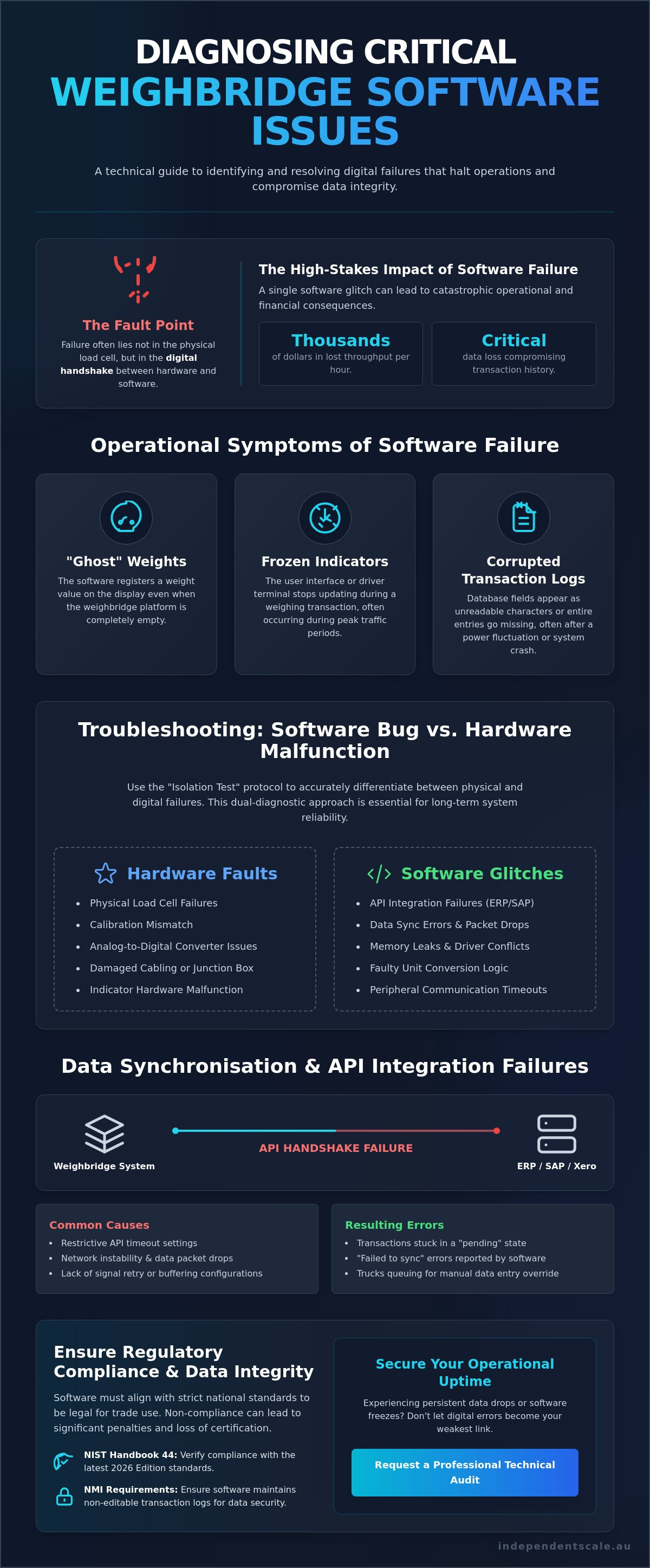
If your scale produces erratic data or freezes during peak traffic, the fault often lies not in the physical load cell, but in a failure of the digital handshake between hardware and interface. With the global weighbridge automation market reaching $4.2 billion in 2025, the complexity of these integrated systems has increased the risk of critical weighbridge software issues. You're likely already aware that a single software hang can result in thousands of dollars in lost throughput per hour and potential data loss that compromises your transaction history.
This technical guide provides the diagnostic protocols necessary to identify and resolve software failures while maintaining strict compliance with NIST Handbook 44, 2026 Edition standards. You'll learn how to differentiate between hardware faults and software glitches, restore broken data synchronisation, and implement preventative measures to stop future weighing errors. We'll break down the steps to secure your operational uptime and ensure your facility meets the latest trade regulations.
Key Takeaways
- Identify specific operational symptoms, such as "ghost" weights and frozen indicators, that signal critical weighbridge software issues during peak traffic.
- Evaluate the technical parameters required for stable API integrations between weighing hardware and ERP systems like SAP to eliminate transaction delays.
- Implement the "Isolation Test" protocol to accurately differentiate between physical load cell failures and digital software malfunctions.
- Maintain regulatory compliance by verifying that your software aligns with National Measurement Institute (NMI) requirements for non-editable transaction logs.
- Understand the necessity of a dual-diagnostic approach that combines hardware calibration expertise with deep software troubleshooting to secure long-term system reliability.
Common Weighbridge Software Issues and Their Operational Symptoms
Modern industrial weighing relies on software to act as the critical interface between analog load cell signals and digital business records. While the physical structure of a weighbridge or truck scale is engineered for extreme durability, the software layer is often the most vulnerable point of failure in the system. Weighbridge software issues manifest when this digital translation layer fails to process incoming data packets in real-time, leading to operational bottlenecks that can halt site production entirely.
Operators must be vigilant for specific symptoms that indicate a software-level failure rather than a mechanical fault. These include:
- "Ghost" weights: The software registers a weight value on the screen despite the platform being empty.
- Frozen indicators: The user interface stops updating during a weighing transaction, often during peak traffic periods.
- Corrupted transaction logs: Data fields in the database appear as unreadable characters or missing entries, often following a power fluctuation.
Software latency directly throttles site efficiency. A delay of just 30 seconds per vehicle leads to significant bottlenecks in facilities processing high volumes of loads daily. Beyond throughput, the risk of data corruption during power surges or improper shutdowns is a major concern. Without robust database management, these fluctuations can compromise the non-editable transaction logs required for regulatory trade compliance.
Interface Freezing and UI Non-Responsiveness
Driver-terminal software hang-ups typically occur due to memory leaks or driver conflicts between the weighing application and the host operating system. Many industrial facilities run legacy weighbridge software on modern Windows versions, creating compatibility gaps that trigger sudden crashes. Peripheral devices like ticket printers, remote displays, and gate bollards are frequent culprits. If the software's communication protocol for a printer times out, it can cause the entire weighing interface to stop responding, halting all site activity until a manual system reboot is performed.
Inaccurate Data Translation from Indicators
Software occasionally misinterprets the digital output from indicators and displays, leading to discrepancies between the physical weight and the recorded value. The "handshake" is the specific communication protocol where the indicator transmits a data string to the software database to ensure the values match exactly. It's vital to distinguish between a rounding error and a calibration mismatch. A software error might involve a fault in the code's unit conversion logic, whereas a calibration mismatch stems from the analog-to-digital converter settings within the indicator hardware itself.
Data Synchronisation and API Integration Failures
Integrating weighbridge systems with ERP platforms like SAP or Xero represents a significant technical hurdle for many industrial operators. This process relies on Application Programming Interfaces (APIs) to push real-time weight data into financial or inventory records. When a system fails to complete this handshake, the result is often a queue of trucks waiting for a manual override. Weighbridge software issues frequently stem from API timeout settings that are too restrictive for the latency found at remote sites. If the server doesn't receive the weight packet within a few seconds, it cancels the request, leaving the transaction in a "pending" state.
In regional Australia, network instability often causes data packets to drop before they reach the central server. If your conditioners and transmitters aren't configured to handle signal retries or buffering, the software will report a "failed to sync" error. Distinguishing between a Software Bug vs. Hardware Malfunction is often difficult when these digital signals are interrupted. Ensuring that the digital signal conversion is robust enough to survive intermittent connectivity is essential for maintaining accurate transaction logs. If you're experiencing persistent data drops, you can verify your system's digital integrity with a professional technical audit.
Database Corruption and Missing Transaction Records
SQL database fragmentation occurs when the physical storage of data becomes scattered across a disk over time. In high-volume industrial environments, this leads to sluggish query times and "timed out" errors during peak weighing hours. These performance lags can cause significant weighbridge software issues if left unchecked. Relying on local-only storage is a dangerous practice. Without cloud redundancy or a structured off-site backup protocol, a single database header corruption can lead to the total loss of legally required transaction records. Operators should monitor for SQL error codes like 823 or 824, which usually point to software-driven corruption rather than a physical drive fault.
Third-Party Software Conflicts
Third-party software conflicts often arise from IT-led security hardening. When a firewall update is pushed across a corporate network, it may block the specific TCP/IP ports, such as 1433 for SQL or custom ports for proprietary weighing drivers, that the weighbridge requires. Security software may also flag legacy drivers as "unsigned," leading to immediate service termination. To prevent this, operators should coordinate with IT to ensure weighing applications are whitelisted. Testing updates in a sandbox environment before deploying them to the live weighing station is a necessary step for maintaining operational uptime.
Troubleshooting Guide: Software Bug vs. Hardware Malfunction
Differentiating between a mechanical failure and a digital glitch is the primary step in resolving weighbridge software issues. The "Isolation Test" is the standard diagnostic protocol used to determine if an error originates in the scale's physical components or the software interface. By comparing the live indicator reading directly against the software display, operators can quickly pinpoint the source of the discrepancy. If the indicator shows a stable, accurate weight while the software fluctuates or freezes, the fault is located within the communication layer or the PC environment.
Follow this structured diagnostic sequence to isolate the fault:
- Step 1: Verify physical scale zero and span stability. Ensure the platform returns to zero after every load and maintains a consistent reading under a known test weight.
- Step 2: Inspect the raw data strings transmitted by the load cells through the indicator’s serial or Ethernet port. Technical tools like a serial monitor can confirm if the hardware is outputting a clean data stream.
- Step 3: Bypass the weighing software entirely by using a terminal emulator. If the emulator receives data packets correctly, the issue is confirmed to be within the weighing application's configuration.
- Step 4: Review the software's internal error logs. Look specifically for "Comm Port" or "Socket" failures, which indicate a breakdown in the handshake between the hardware driver and the database.
Identifying Load Cell Signal Noise
Electrical interference often mimics the symptoms of a software glitch, causing erratic weight jumps on the screen. High-voltage cables or radio frequency interference can contaminate the signal before it reaches the PC. Junction boxes are critical for signal stability because they provide the necessary shielding and summing of load cell outputs to ensure a clean transmission. If signals remain erratic after hardware isolation, it's time for professional load cell calibration to reset the analog-to-digital thresholds and eliminate signal noise.
Software Configuration and Calibration Offsets
Systematic errors frequently occur when software calibration factors do not match the indicator's internal settings. These discrepancies are often the root cause of persistent weighbridge software issues in multi-site operations. A common mistake is "software zeroing," where the application forces a zero reading on a physically un-zeroed scale. This practice is dangerous as it masks mechanical issues like debris buildup under the platform. For trade-certified systems, all modifications to these factors must be recorded in an audit trail to meet OIML D 31 software requirements. Checking the history of who changed these settings is a standard part of any forensic technical audit.
Ensuring Software Compliance and Data Integrity for Trade Use
Compliance in industrial weighing is not limited to the physical structural integrity of the platform. Under Australian law, the National Measurement Institute (NMI) regulates the entire measuring instrument, which includes the software interface used to process transactions. If your facility encounters weighbridge software issues that affect data recording or the visual display of weights, you risk breaching trade-legal requirements. Non-editable transaction logs are a fundamental necessity for trade verification. These logs ensure every weight recorded for commercial purposes remains traceable and tamper-proof from the moment of capture.
Software updates represent a significant operational risk. An unverified update can inadvertently void a system's trade-legal status if the new version hasn't been assessed under the original pattern approval. During a weighbridge compliance audit, inspectors verify that the software version currently in use matches the official NMI certificate of approval exactly. Discrepancies often lead to the immediate decommissioning of the scale until a licensed technician performs a full re-verification. You must treat software maintenance with the same level of regulatory scrutiny as physical calibration.
NMI Pattern Approval for Software
Pattern Approval ensures the software interface handles metrological data according to strict standards. For industrial operators, this means the on-screen weight display must be clear, unambiguous, and formatted correctly. The software must also prevent the storage or printing of weights when the scale is in an unstable state or below a minimum threshold. Always verify your current software version against your NMI certificate. Discrepancies are common weighbridge software issues that arise when IT departments perform system maintenance without understanding metrological constraints. It's a technical requirement that often goes overlooked until an audit fails.
Secure Data Logging and Audit Trails
Manual overrides in weighing software are a high-risk area for trade compliance. While overrides are sometimes necessary for operational flow, every instance must be logged within a secured audit trail. This trail must include the date, time, and a specific justification for the change. Australian data retention policies require these logs to be archived securely to prevent retroactive tampering. Comprehensive calibration services validate that the hardware output matches these digital records precisely. If you're unsure of your system's legal standing, you should arrange a professional compliance audit to ensure your software environment meets all current NMI standards.
Professional Diagnostic and Software Support Services
General IT firms often struggle to resolve weighbridge software issues because they lack the specialized background in legal metrology and signal processing. While a standard technician understands network architecture, they rarely possess the expertise required to manage NMI pattern approvals or interpret raw load cell data strings. Independent Scale Service bridges this technical gap. We provide a dual-competency approach that merges deep hardware knowledge with advanced software diagnostics to ensure your data remains accurate from the platform to the database.
Downtime is expensive. To minimize operational interruptions, we recommend regular software health checks conducted alongside your scheduled NATA calibration. These audits verify that your software logic still aligns with your physical hardware output, preventing the "drift" that often leads to systematic weighing errors. Our technicians use proactive maintenance protocols and remote support tools to identify bottlenecks before they cause a total system failure. This integrated service model ensures that your facility maintains high throughput without compromising on data integrity.
Customised Software Solutions and Upgrades
Transitioning from legacy systems to modern, integrated weighing platforms is essential for facilities looking to automate their data flow. We specialize in configuring systems where tank and silo weighing assemblies must communicate directly with centralized plant controllers. In high-precision environments like concrete batching plants, software must maintain strict AS 1379 compliance to manage complex recipes and moisture adjustments. We ensure your software interface is not just functional, but optimized for the specific regulatory and technical demands of your industry.
Contact Independent Scale Service for Support
Our technical team is available to assist with urgent weighbridge software and hardware repairs for clients throughout Sydney and Melbourne. We understand the urgency of industrial operations and focus on providing rapid, reliable resolutions to restore your site's productivity. If your current system is prone to freezing, data loss, or sync errors, a comprehensive site audit can identify the underlying software bottlenecks. We provide the technical clarity needed to secure your weighing infrastructure against future failures.
Contact our expert team for weighbridge software diagnostics today.
Secure Your Weighing Infrastructure and Compliance
Maintaining high-volume industrial throughput requires the seamless integration of precision hardware and robust digital interfaces. Resolving persistent weighbridge software issues involves a methodical approach that separates mechanical faults from communication errors while adhering to strict NMI standards. As outlined in this guide, securing your non-editable transaction logs and verifying API stability are critical steps for both operational efficiency and legal trade compliance.
Independent Scale Service is NATA Accredited to ISO/IEC 17025 and serves as a trusted authority for facilities in Sydney, Melbourne, and regional Australia. We specialize in AS 1379 compliance and provide the technical diagnostic capabilities that standard IT providers cannot offer. By prioritizing proactive software health checks and professional calibration, you protect your site from unplanned downtime and regulatory penalties. Our expert team is ready to assist you in building a reliable, data-driven weighing infrastructure.
Get Expert Weighbridge Software Support to secure your facility's technical performance today.
Frequently Asked Questions
Why is my weighbridge software showing a different weight than the indicator?
Discrepancies between the software and indicator often stem from incorrect calibration factors or digital offsets configured in the PC interface. While the indicator transmits raw data, the software may be misapplying a unit conversion or a rounding rule. You should verify the communication protocol settings and ensure the software's translation logic matches the indicator's physical output. This discrepancy is a common indicator of a failing digital handshake.
Can a software update cause my weighbridge to lose its trade-legal status?
Yes, unauthorized software updates can void your scale's trade-legal status if the new version isn't listed on the NMI certificate of approval. Australian trade regulations require that the entire measuring system, including the software interface, remains compliant with the approved pattern. If a software change alters how weight data is processed or displayed, the weighbridge must be re-verified by a licensed technician to ensure legal compliance.
How do I know if a weighbridge issue is caused by the software or the load cells?
Use an isolation test to determine the fault's origin. If the weight reading on the hardware indicator is stable but the software display is erratic or frozen, the problem is digital. However, if the indicator itself shows fluctuating values or fails to return to zero, the fault lies in the load cells or physical cabling. Identifying weighbridge software issues early prevents unnecessary hardware replacements when the fix is actually code-based.
What should I do if my weighbridge software freezes during a transaction?
When a freeze occurs, check for non-responsive peripheral devices like printers or remote displays. Weighing applications often stop responding if they're waiting for a signal from a disconnected or faulty external component. If peripherals are functional, the issue may be a memory leak or a conflict with the operating system's background updates. A system reboot is a temporary fix; a permanent resolution requires reviewing the software's error logs.
Is it possible to integrate my weighbridge software with my existing ERP system?
Modern industrial weighing software is designed to integrate with ERP systems like SAP or Xero via Application Programming Interfaces (APIs). This integration allows for the automatic transfer of weight data and transaction logs into your financial or inventory management records. Correct configuration ensures that data flows securely without manual intervention, reducing the risk of clerical errors and improving the overall efficiency of your site operations.
How often should weighbridge software be updated or audited for compliance?
You should audit your weighbridge software during every scheduled NATA calibration or at least once every twelve months. Regular audits verify that the software logic hasn't drifted and that the version remains compliant with NMI standards. Frequent checks are especially important if your site undergoes IT network changes or security updates, as these can inadvertently disrupt the communication ports used by the weighing system.
Does NATA accreditation cover weighbridge software diagnostics?
NATA accreditation to ISO/IEC 17025 confirms that a service provider meets international standards for technical competence and measurement accuracy. While the accreditation focuses on the calibration process, it ensures that the technician has the expertise to validate that the software is accurately recording and displaying the calibrated weights. This rigorous oversight provides assurance that both your hardware and software diagnostic results are technically sound and reliable.
What are the most common causes of data loss in weighbridge systems?
The primary causes of data loss are SQL database corruption following power surges and the absence of off-site backup protocols. High-volume sites generate massive amounts of data; if a write operation is interrupted by a power failure, the database header can become unreadable. Implementing cloud redundancy and using a UPS are critical strategies to prevent these weighbridge software issues from compromising your legally required transaction history.
