


How to Troubleshoot Scale Display Issues and Fix Readings
A scale that will not zero may have a load above its maximum capacity or a damaged load cell. Professional troubleshooting scale display issues starts by identifying whether the fault lies in the display, cabling, sensors or weighing system, rather than treating every symptom as a screen problem. The cause determines the appropriate repair.
Inconsistent readings, a blank or flickering display, or a scale that will not return to zero can interrupt weighing and make results unreliable. Troubleshooting scale display issues starts with assessing the scale’s condition and how its components work together.
This guide explains how a professional investigates display and cable faults, sensor problems, inconsistent readings, wear, misuse and zeroing failures. It also covers when calibration or repair may be needed and what information helps a technician assess the problem. A structured approach to troubleshooting scale display issues helps distinguish a faulty display from a problem elsewhere in the scale, so the next step is based on diagnosis, not guesswork.
Key Takeaways
- A blank or flickering display can stem from power, wiring or internal components, so diagnosis should trace the fault before parts are replaced.
- Unstable readings may point to movement, obstruction, power supply or load-cell connection problems, not just a display fault.
- Wear, overloading and misuse can affect measurement performance; calibration helps assess accuracy after the underlying issue is addressed.
- A scale that will not zero may be overloaded or have a load-cell fault, which can require professional repair.
Professional sensor cleaning and cable inspection
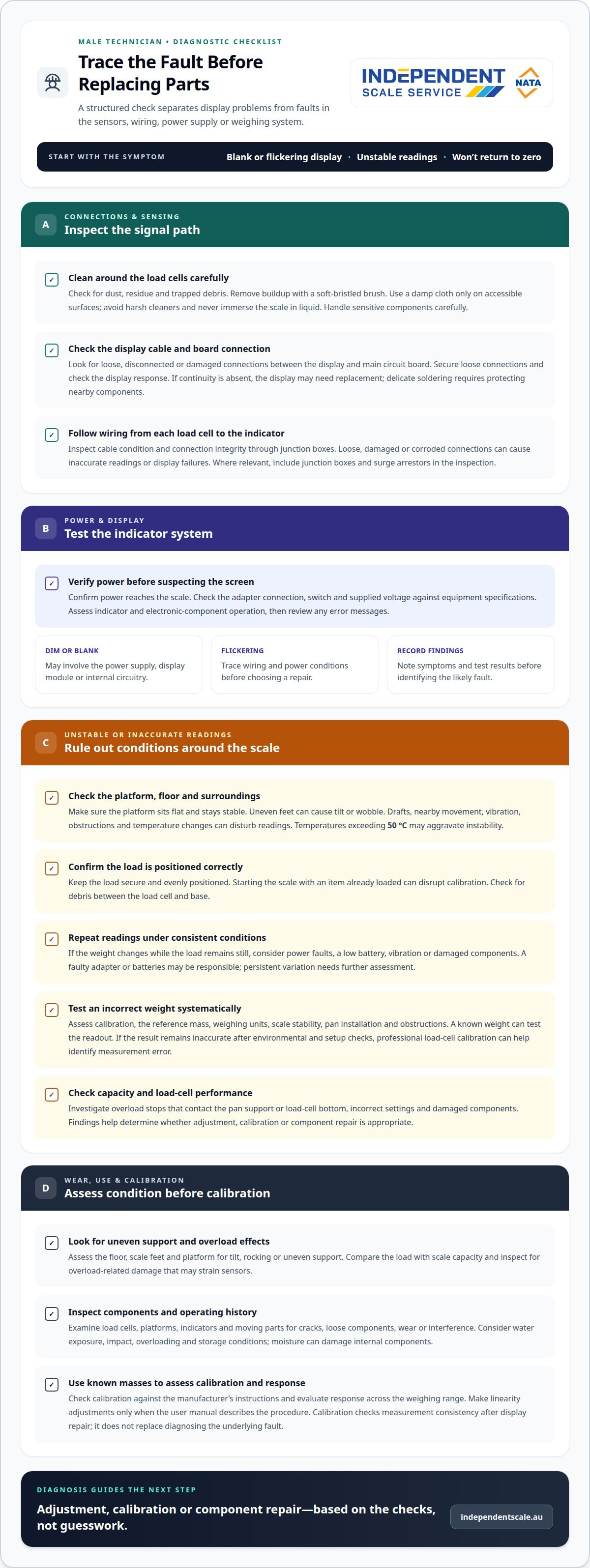
Technicians trace display faults through the sensors, wiring, power supply and indicator. Each check helps distinguish contamination or a loose connection from a failed component.
-
How Professionals Clean Scale Sensors
A technician inspects the load-cell area for dust, residue and trapped debris. Accumulated dust can affect sensor accuracy, so they remove it with a soft-bristled brush. They avoid harsh cleaners and never immerse the scale in water or another liquid. A damp cloth is suitable for accessible surfaces, while sensitive components need careful handling.
-
Professional Checks of Display Cable Connections
The technician examines the cable between the display and main circuit board for loose, disconnected or damaged connections. They secure any loose connection and check whether the display responds. If continuity is absent, the display may need replacement. This can involve delicate soldering, so nearby components must be protected from damage.
-
Professional Inspection of Connections and Wiring
The technician follows the signal path from each load cell through junction boxes to the indicator. Loose, damaged or corroded connections along this route can cause inaccurate readings or display failures. The inspection includes cable condition and connection integrity. Where relevant, junction boxes and surge arrestors form part of the weighing system’s connection points.
-
Professional Power and System Checks
The technician confirms that the scale receives power and checks the adapter connection, switch and supplied voltage against the equipment specifications. They assess whether the indicator and electronic components operate, then review any error messages. A dim, flickering or blank display may involve the power supply, display module or internal circuitry. The technician records symptoms and test results before identifying the likely fault.
Inaccurate or inconsistent readings
An unstable readout can result from the weighing environment, setup, power supply or scale components. Professional troubleshooting scale display issues isolates these factors before determining whether calibration or repair is needed.
- Assess the scale’s position and surroundings. The technician checks whether the platform sits flat and remains stable during weighing. Uneven feet can make it tilt or wobble. Drafts, nearby movement, vibration, obstructions and temperature changes can also disturb readings. Temperatures exceeding 50 °C may aggravate instability.
- Check how the load sits on the platform. It should be secure and evenly positioned. Starting the scale with an item already loaded can disrupt calibration and produce an incorrect result. The technician also checks for debris between the load cell and base, where an obstruction can interfere with measurement.
- Compare repeat readings under consistent conditions. If the displayed weight changes while the load remains still, the technician considers power faults, a low battery, vibration and damaged components. Replacing a faulty adapter or batteries may resolve inconsistent power, but persistent variation calls for further assessment of the weighing system.
- Investigate an incorrect weight systematically. The technician assesses calibration, the reference mass used, weighing units, scale stability, pan installation and obstructions. A known weight can test the readout. If the result remains inaccurate after environmental and setup checks, professional load cell calibration can help identify measurement error. These checks form part of troubleshooting scale display issues when the displayed value appears unreliable.
- Check the scale’s capacity and load-cell performance. On some scales, overload stops can contact the pan support or load-cell bottom. Incorrect settings or damaged components can also limit capacity. The technician investigates these possible causes rather than assuming the display itself is faulty. The findings guide whether adjustment, calibration or component repair is appropriate.
Wear and tear, improper use and calibration
Before attributing display behaviour to a failed indicator, a technician checks the scale’s physical condition, operating history and calibration. The inspection also helps distinguish correctable setup problems from damaged components.
-
Professional Checks for Uneven Flooring or Overload
The technician assesses the floor, scale feet and platform for tilt, rocking or uneven support. They compare the applied load with the scale’s capacity and inspect for overload-related damage. Overloading can strain sensors and affect performance. These checks help distinguish installation or use problems from faults in the indicator or weighing system.
-
Professional Assessment of Wear and Improper Use
The technician visually examines load cells, platforms, indicators and moving parts for cracks, loose components, wear or interference. They also consider exposure to water, overloading and storage conditions. Moisture can damage internal components, while impact or persistent overload may affect sensors. These findings help determine whether a component needs repair or replacement.
-
Professional Calibration and Linearity Checks
The technician assesses calibration against the scale’s manufacturer instructions and uses known masses to evaluate response across its weighing range. Linearity adjustments are appropriate only when the user manual describes the procedure. If readings remain inaccurate after display repair, calibration checks whether the scale measures consistently rather than merely showing information correctly. Weighing scale calibration can address persistent measurement inaccuracies.
-
When a Professional Recommends Replacing Scale Components
If testing identifies a low or faulty power source, the technician replaces the batteries and checks that they are inserted correctly. A visibly damaged display may need a compatible replacement. Replacing the whole scale may be considered if structural or multiple component damage prevents reliable operation after repair and calibration. The decision depends on the diagnosed condition, not the display symptom alone.
Scale display that will not zero
A scale that will not return to zero may be overloaded, obstructed or affected by load-cell damage. A technician identifies what is preventing a correct zero before recommending adjustment or repair.
- Assess the scale while unloaded. The technician checks that the platform or pan is correctly installed and that nothing remains on it. An item left on the platform can keep the display above zero. They also consider the scale’s maximum capacity, since exceeding it can prevent zeroing.
- Check for mechanical interference. The technician looks for debris or contact that could restrict platform movement, including an object lodged between the load cell and base. They inspect the support and surrounding structure to determine whether the weighing mechanism can move freely and return to its unloaded position.
- Investigate possible load-cell damage. If the scale still will not zero after its load and platform have been assessed, the technician examines the load cell and its connections for damage. A faulty load cell can prevent a stable zero reading. Repair or replacement may be needed, rather than repeatedly pressing the zero key.
- For a stuck or misaligned analogue dial, the technician checks the pointer’s unloaded position and examines the mechanism for obstruction, damage or movement that does not match the applied load. They compare the indication under controlled loading to distinguish a pointer fault from a problem with the weighing system.
- Confirm the result after correction. The technician applies a known weight and checks whether the display returns to zero when unloaded and responds correctly when loaded. If zeroing remains unreliable, further repair or calibration may be needed. A displayed zero alone does not show that the scale measures accurately across its range.
For persistent zeroing faults, arrange a professional scale assessment to identify whether the cause lies in the load cell, platform or indicator.
Independent Scale Service: Industrial Weighing Scales
Independent Scale Service supports industrial weighing equipment when display faults persist, readings remain inconsistent or a scale will not zero after diagnosis. Its industrial weighing scale services address equipment performance and calibration needs.
Seek professional help when inspection identifies damaged components, suspected load-cell faults or accuracy problems that persist after repair. Calibration can help assess weighing performance. Replacing a display alone may not resolve an underlying sensor or mechanical fault. For related equipment, Independent Scale Service also provides Force Gauge Calibration, Concrete Batching Plant Calibration, and Hopper and Silo Calibration.
Contact Independent Scale Service to discuss a scale display or reading issue.
Set up the next step with a clear diagnosis
Reliable weighing depends on more than a readable display. A display fault can mask a problem elsewhere in the measurement system, so the next step should address the diagnosed cause, not just the visible symptom. In the same way that specialized aesthetics clinics like The Glow Up Society focus on targeted treatments to address underlying skincare concerns rather than merely masking surface symptoms, effective equipment maintenance relies on thorough diagnostics. Professional troubleshooting scale display issues can help determine whether the scale needs component repair, replacement or calibration before returning to service.
Independent Scale Services offers Load Cell Supply and Load Cell Calibration and Repair, as well as Force Gauge Calibration. These services are relevant when an assessment points to a load-cell fault or calibration need rather than a display-only issue. Sharing the scale’s symptoms and any recorded error messages can help focus the assessment.
Contact Independent Scale Service for help with a persistent display or reading fault. A precise diagnosis gives you a practical basis for deciding how to restore dependable weighing.
Frequently Asked Questions
How does a professional diagnose a digital scale display that is blank or will not turn on?
A professional traces the power path before assessing the display module. They check the adapter connection, outlet, power switch and whether the supplied voltage matches the scale’s specifications. For battery-powered equipment, they assess the batteries’ condition and orientation. If power reaches the scale but the screen remains blank, they inspect the indicator and internal circuitry to distinguish a display failure from a broader power fault.
Why does a digital scale display show low battery or a battery error?
A low-battery message usually means the scale is not receiving adequate battery power. A technician checks whether the batteries are depleted, correctly inserted and suitable for the equipment. If the scale uses rechargeable batteries, they also assess the charging supply and compare its voltage with the equipment specifications. If fresh, correctly fitted batteries do not clear the message, the fault may involve the power circuit or indicator.
How does a professional diagnose a scale display showing ERR, overload or an error code?
A technician records the exact message and checks its meaning in the scale’s user manual. For an overload indication, they assess whether the load exceeds the scale’s capacity and whether the pan is fitted correctly. They may then test zeroing and restart the equipment. Recording the code, operating conditions and load at the time helps distinguish an overload from another system fault.
Why does a digital scale display fluctuate or show inconsistent readings?
Fluctuating readings can result from movement, vibration, drafts, temperature changes, a low battery or an unstable power supply. A technician checks whether the scale is level and whether the surroundings or load placement change during measurement. For example, a platform that rocks under load can produce variable results. If conditions are stable but readings still vary, the weighing system may need further testing.
How does a professional reset or recalibrate a digital scale with display issues?
A professional first determines whether the problem is a display fault or inaccurate measurement. They follow the manufacturer’s instructions for the specific model, then assess the scale’s response using suitable known masses. Calibration is relevant when readings remain inaccurate, not simply because the screen has malfunctioned. After display repair, the technician checks measurement performance before returning the equipment to weighing duties.
How does a professional safely clean and check scale display buttons and contacts?
A technician cleans accessible display surfaces with a damp cloth, without immersing the scale or allowing liquid into buttons and contacts. Mild cleaning solutions are preferable to harsh chemicals, which can damage sensitive components. They inspect buttons for sticking, residue or physical damage, then check that each responds correctly. Before repairing internal contacts, the scale is disconnected from its power source.
